festive color palettes wordpress website ZS58KZ
WordPress News

Seasonal Color Palettes and Style Tips to Refresh Your Website for the Holidays

The end of the year is here, and with it comes a season of excitement and celebration! Whether you’re bundling up in cozy sweaters and snow boots or soaking up the sun in swimsuits, this time of year has something special for everyone. No matter where you are in the world, the final quarter brings festive holidays and celebrations to look forward to.

If you’re looking to capture the magic of the season on your website, try a pop of festive, holiday-inspired color or a cozy new theme. It’s the perfect way to welcome the season for you and your site visitors—whether they’re browsing for a holiday recipe, shopping for gifts, or exploring a guide to the best cross-country ski destinations.

Today we will show you how you can bring those festive feelings to your site with a few of our favorite color palettes and themes, along with where to find free illustrations and images to bring a refreshing seasonal touch to your site.

Festive color palettes

Here are four festive color palettes––ranging from bright and bold to chill and subtle––that will give your site some holiday spirit:

Joyful winter

This winter-inspired color palette features warm, inviting hues of soft coral and deep red, balanced by a neutral blush and grounded by cool teal and navy. Incorporating these colors into your WordPress site creates a cozy and joyful vibe.

a red and blue color palette with five different colored circles
Blush Ember
#E37C77
Crimson Hearth #B84138Rose Mist
#DFC5C6
Teal Drift
#3D8391
Midnight Fjord
#1C4864
a screenshot of a website with a pink background, black and white photos, and a blue line at the top
Blogorama theme

Winter frost

This winter color palette offers a harmonious blend of soft neutrals and cool blues, creating a warm and calm earthiness on your website. Perfect for a more sophisticated Hanukkah palette or a serene winter feel. 

a blue and grey color palette with five different colored circles
Frosted Silver
#DDDFDE
Cozy Taupe
#C1B4A8
Chestnut Glow
#A48E7F
Winter Night
#365A72
Icy Horizon
#6A91A9
a screenshot of a website with a light blue and white color palatte and a picture of a brunch spread
Byrne theme

Classic gingerbread

This palette captures the essence of a cozy, rustic holiday with its warm earthy tones and timeless charm—perfect for creating a welcoming, homey Christmas atmosphere. It’s so inviting, that you can almost smell the gingerbread baking!

a green, red, brown, and orange color palette with five different colored circles
Deep Forest Green
#2E4D34
Warm Burlap
#A67B5B
Cranberry Red
#B22222
Creamy Beige
#F5F5DC
Burnt Orange
#D2691E
a screenshot of a website with a creamy beige background and green text and a photo of ceramics
Marl theme

Jewel box winter

This palette is the jewel box of winter—perfect for those who prefer bold, vibrant colors in their branding and design. Its rich, saturated tones add a pop of color that stand out beautifully against classic autumn and winter hues. Best of all, it’s incredibly versatile, making it easy to expand and adapt throughout the year.

a yellow, purple, and green color palette with five different colored circles
Golden Spice
#E99739
Plum Wine
#693551
Harvest Olive
#686610
Forest Ember
#273223
Creamy Chai
#F8E1C8
a screenshot of a website for a jewelry company with a creamy chai background and purple accents
Aether theme

Updating your site colors

Use any of these palettes as a starting point for your site’s color refresh. To begin, take a look at your existing site and see if one of these palettes align well with your existing site branding. You can do this by swapping in just a color or two—you likely won’t use every color in the palette. 

After choosing a palette, consider updating product or lifestyle images to echo these colors. If you need help sourcing stock photos, we’ll dive into that below.

If you’re new to customizing your site’s look, don’t worry—the WordPress.com Editor makes it easy. You can set a custom palette, add custom colors, and apply updates across your site, covering all the consistent elements like text, headings, links, backgrounds, buttons, and more.

When you’re ready to start implementing your new color palette, this tutorial is the perfect guide to get you going: Custom Colors on WordPress.com.

Winter-inspired themes

If you’re looking for a bigger site refresh, changing not just your colors but your theme can instantly elevate the look and feel of your website in a more impactful way. Here are a few of our favorite themes that instantly bring the cozy-cottage charm to life: 

Cottage

an iPad, computer, and mobile view of the Cottage WordPress.com theme on a green background

Cottage is a beautifully-crafted theme that brings the charm of the countryside to your online space. Featuring a warm palette of earthy tones, subtle textured backgrounds, and timeless serif fonts, Cottage is all about rustic simplicity and warm natural elements. 

Nook

an iPad, computer, and mobile view of the Nook WordPress.com theme on a light blue background

Nook is a classic two-column blog theme with a sidebar. Its versatile, timeless design creates a warm, familiar feel, providing the perfect space for sharing your DIY projects, tasty recipes, and creative inspirations.

Dorna

an iPad, computer, and mobile view of the Dorna WordPress.com theme on a light grey background

Dorna is a clean, product-focused theme, and its warm, inviting design and simple layout make it ideal for online shops featuring cozy, modern homewares and furniture.

Resources for seasonal photography and illustrations

Photography and illustrations are fantastic ways to bring your new color palette and/or theme to life. If you’re not capturing photos yourself or just want a fresh look, Pexels, Unsplash, and Pixabay all offer a wide selection of free, high-quality photos and illustrations. Even better, Pexels is fully integrated into your WordPress.com media library, allowing you to easily add copyright-free images directly to your site.

the Pexels Free Photos button selected in the WordPress.com editor

When searching for images to add to your site, here are a few seasonal keywords to get you started: warm ambiance, hygge, fall leaves, snug nook, warm lighting, autumnal vibes, natural tones, fireside, rustic charm, homey feel, earthy tones, woolen textures, and cozy fall.

You can also incorporate seasonal pops of color by adding custom graphics to your site. Canva is an excellent tool for creating custom visuals, with easy-to-use templates for everything from banners to sidebar graphics. It’s a simple, freemium way to add that extra festive touch to your WordPress site.


As we start looking at the new year ahead, it’s the perfect time to refresh your website with a look and feel that captures the spirit of the season—whether it’s fall and winter in the northern hemisphere or spring and summer in the southern hemisphere.

So go ahead—dive into the season with a new look! Try out one of our free or premium themes, and let your creativity run wild.

 [#item_full_content]

Seasonal Color Palettes and Style Tips to Refresh Your Website for the Holidays Read Post »

Xoops CMS News

Release of xmcontent version 0.21

I am pleased to announce the release of xmcontent 0.21 final!

Xmcontent is a simple content module for XOOPS. This module allows create content pages. The main point on the module:
• Individual permissions for all contents.
• Keywords (SEO) per content editable.
• Description (SEO) per content editable.
• Header and footer Customizable on the module home page.
• Selection xoops editor.

What’s new in version 0.21:
• Use a css file personalized by content (you can add a custom css to a content).
• Use a template file personalized by content (you can add a custom template to a content).
• The XOOPS search is integrated.
• A short description of the content is available on the module home page

This is only the beginning, if you have suggestions for future versions is here:suggestions

Download: Releases
Bugs: Issues

The modules are optimized to run on the 2.5.8 version of XOOPS, but it works on 2.5.7.

Important: The templates use Bootstrap, so you must use a Bootstrap theme, e.g. xBootstrap that comes with XOOPS 2.5.8
 XOOPS Web Application System 

Release of xmcontent version 0.21 Read Post »

12431543244 02e17138c5 o 9bArZ0
Xoops CMS News

MyMenus 1.51 Final, with Drag & Drop, Is Released

Thanks to Bleekk and the XOOPS Germany team, we have now “Drag & Drop” incorporated into MyMenus Module.

In the picture below, you can see the links as bars that you can drag around to set the sorting, as well as the sub-links:

Original Image

Also incorporated are changes from Luciorota, who added an option to use skins from the theme.

As always, it is great to see when developers are working as team and are helping each other! smil3dbd4d6422f04

If you find any bugs, please report them here, or directly on GitHub:

https://github.com/XoopsModules25x/mymenus/issues

As always, we encourage everybody to fork it and help us by contributing back to the development.

Download: GitHub

Development: GitHub

Tutorial: GitBook

You can contribute to the tutorial, as well as provide translation, on GitHub XOOPS Docs

Check out XOOPS on GitHub: Let’s Get involved! XOOPS Web Application System 

MyMenus 1.51 Final, with Drag & Drop, Is Released Read Post »

12431543244 02e17138c5 o Zmu0s8
Xoops CMS News

MyMenus 1.52 Final, with Drag & Drop, Is Released

MyMenus 1.52 Final for XOOPS 2.5.8+ and PHP 5.5+ (incl. PHP 7) has been released – this release fixes issues with static methods discovered by Goffy.

Original Image

Thanks to Bleekk and the XOOPS Germany team, we have now “Drag & Drop” incorporated into MyMenus Module.

In the picture above, you can see the links as bars that you can drag around to set the sorting, as well as the sub-links:

Also incorporated are changes from Luciorota, who added an option to use skins from the theme.

As always, it is great to see when developers are working as team and are helping each other! smil3dbd4d6422f04

Download: GitHub

Issues/Bugs: please report them directly on GitHub

As always, we encourage everybody to fork it and help us by contributing back to the development.

Development: GitHub

Tutorial: GitBook

You can contribute to the tutorial, as well as provide translation, on GitHub XOOPS Docs

Check out XOOPS on GitHub: Let’s Get involved! XOOPS Web Application System 

MyMenus 1.52 Final, with Drag & Drop, Is Released Read Post »

XoopsBootstrapThemes10 v3mt7j
Xoops CMS News

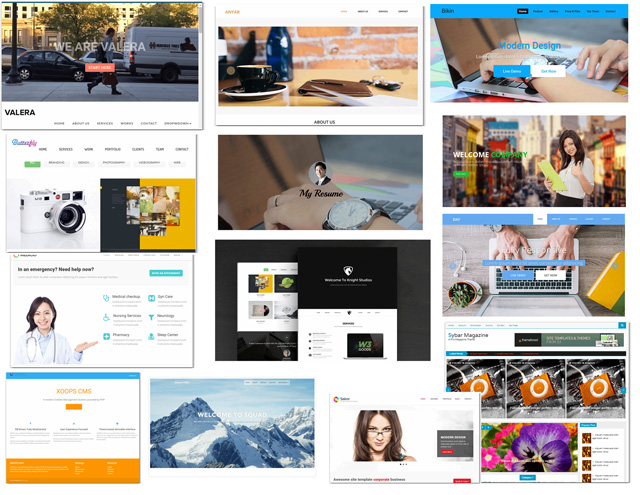
10 Bootstrap Themes converted to XOOPS (Alpha release)

Original Image

I started a conversion of 10 Bootstrap themes to XOOPS, but I’ll need help from some of our XOOPS Design Experts! smil3dbd4d6422f04

Anyar

Butterfly

Company

Day

Knight

Medicio

MyResume

Sailor

SybarMagazine

Valera

I also played a little bit with Materialize, so maybe somebody can continue with it:
https://github.com/mambax7/theme-xmaterialize

IMPORTANT NOTE: This was only a “Proof of Concept” study about how quickly could we convert Bootstrap Themes to XOOPS. These themes are in ALPHA release, and will need some help from our XOOPS Designers before they become usable.

Therefore please DO NOT use them on production sites. However, please fork them, improve them, and help us with development. smil3dbd4d6422f04

Anyar

Original Image

Demo/Info

Download/Development

 XOOPS Web Application System 

10 Bootstrap Themes converted to XOOPS (Alpha release) Read Post »

smil3dbd4d6422f04 zdcR6E
Xoops CMS News

XOOPS Website in transition

In the next few weeks the XOOPS Website will be very busy, with a lot of work happening in the front of you! smil3dbd4d6422f04

Instead of making a secret out of it, and then creating a huge splash out of it, we’ve decided to just go ahead and make changes to the Website as we go.

What is happening:

1) We are moving to PHP 7. Originally we were on 5.4, and this weekend we moved to PHP 5.6, as as soon as our host offers PHP 7, we’ll be ready.

2) We’ve also moved the Website to the latest XOOPS Core, so we can test it here before we officially release it.

3) We are also updating all modules that are being used here, which will help us, of course with your help, to discover any bugs smil3dbd4d6422f04

We have updated the NewBB Forums to the latest version, as well as News. We’ll be converting soon the News to Publisher, as strategically that’s what we want to invest our time in.

And we’ll be adding some new cool modules, like the one upcoming wgTimelines developed by Goffy from Germany. We’ll transition our “XOOPS Innovators” and “XOOPSer of the Month” awards there. The work on the converting the “XOOPS Innovators” to the wgTimelines has already started – you can check it out herehttps://xoops.org/modules/wgtimelines/

What else?

We have moved modules developed by Wishcraft to one location on GitHub (read more here), so you can check them out, fork, and contribute back.

We have also created one GitHub location for various XOOPS D3 modules. If you’re curious what the D3 modules are, please read more here

Of course, we hope that you’ll help us on this journey as we’re moving closer to the next release of XOOPS smil42e7a3d4c7b9f

And in case you were wondering, yes, we’re looking for a new responsive theme for this updated Website! So if you would like to design a new theme for us, please let us know… XOOPS Web Application System 

XOOPS Website in transition Read Post »

Xoops CMS News

XOOPS PHPMailer Security Patches Released

The XOOPS Development Team is pleased to announce the release of security patches for XOOPS 2.5.8 and XOOPS 2.5.7.2.

These patches includes the latest version of PHPMailer to address a serious vulnerability. All XOOPS users are encouraged to update as soon as possible.

Both full distributions and patch files (from the most recent prior release) for both the 2.5.7 and 2.5.8 series are available.

Any users that are running older XOOPS versions are advised to update to XOOPS 2.5.8.1 now.

Get XOOPS 2.5.8.1

Release files are available on GitHub.

The 2.5.8.1 files are also mirrored on the XOOPS File Repository on SourceForge

Get XOOPS 2.5.7.3

Release files are available on the XOOPS File Repository on SourceForge XOOPS Web Application System 

XOOPS PHPMailer Security Patches Released Read Post »

Oh hi there 👋
It’s nice to meet you.

Sign up to receive
cost savings in your inbox,
aevery month.

We don’t spam! Read our privacy policy for more info.

Scroll to Top